Special: Dry Eye Clarity Evaluation $125 $0 Dry Eye Clarity Evaluation — use code DRYEYE7 • 12 spots left
Your Screen & Eye Comfort Guide Is Ready
Download your guide below, then watch the walk through the three desk practices.
Watch: Three Practical Steps for Screen-Heavy Workdays

By Advanced Dry Eye & Wellness · October 2026 · 6-minute watch
Follow along as we demonstrate screen breaks, complete blinking, and monitor position.
★ Rather skim? Here’s the workday walkthrough.
1. Give your eyes a distance break.¹ Look about 20 feet away for 20 seconds. Keep your eyes relaxed and blink naturally.
2. Practice a complete blink. Follow the close-close-squeeze sequence demonstrated in the video. Stop if it hurts.² The goal is comfortable practice, not force.
3. Set your screen for a comfortable downward gaze. Keep the top of your monitor at or below eye level, with your head and neck comfortable.⁴
4. Check what’s blowing toward your face. Turn off or redirect desk and ceiling fans that send air toward your eyes.⁶ The PDF also includes eye-drop options to discuss with your eye-care professional.
5. If discomfort keeps returning, take the next step. Dr. Saxena is covering your $125 evaluation—making it 100% FREE. Due to 1-on-1 specialist care, only 7 spots are available this week.
Step 1: Look away from the screen
Choose something about 20 feet away, across the room or outside a window. Look at it comfortably for 20 seconds, blinking naturally.¹
A short pause you can fit between work tasks.
You don’t need to stare, hold your eyes open, or make this complicated.
Research on 20-20-20 reminders found symptom improvements over two weeks. It did not establish instant relief from a single break.¹
Think of this as a workday habit to practice, rather than a promise that one pause will solve recurring discomfort.
Keep a reminder somewhere you’ll notice it during the day.

“Look at it comfortably for 20 seconds.”
That’s the first step: look away, relax, and blink naturally.
Step 2: Practice a complete blink
The video demonstrates a simple sequence: close, open, close again, briefly squeeze, and open.
Close your eyes normally for two seconds. One… two. Open.
Close them again for two seconds. One… two.
Keeping them closed, briefly squeeze your eyelids together for two seconds. One… two. And open.
Do not press on your eyes or squeeze through discomfort. Stop the exercise if it hurts.
The phrase to help you remember the order is:
“Close-Close-Squeeze.”
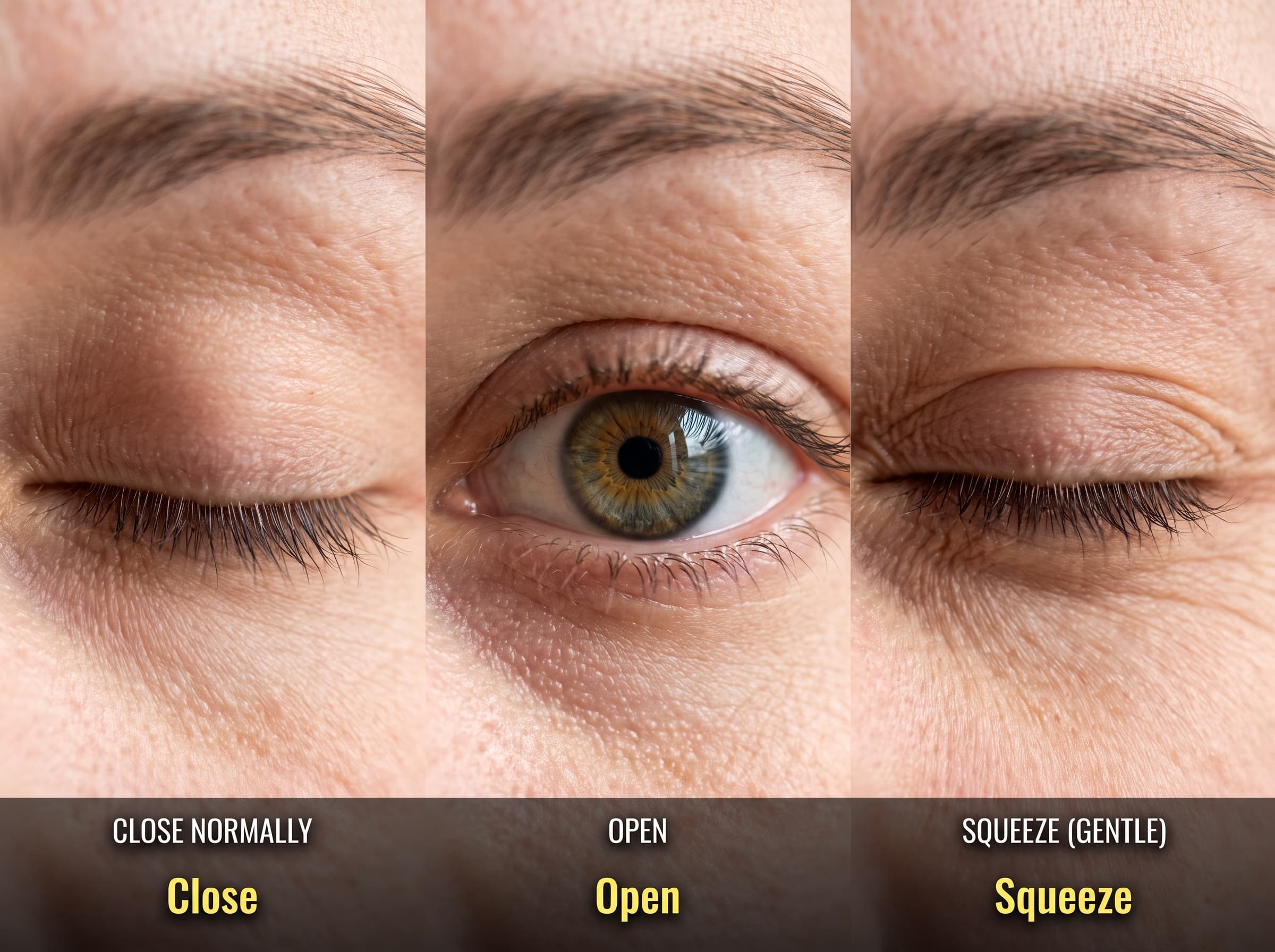
Comfort matters more than force. A study of repeated blinking exercises found improvements over four weeks; it does not establish an immediate result from this demonstration.²
⏱ Follow the sequence
- · Close normally for two seconds
- · Open, then close for two seconds
- · Briefly squeeze for two seconds
- · Open again
☀ Keep the practice comfortable
- · Don’t press on your eyes
- · Don’t squeeze through discomfort
- · Stop if an exercise hurts
- · Ask your eye-care professional if unsure
Practice the sequence while following the video, at a comfortable pace.
Step 3: Adjust your screen position
Set up your monitor so the top is at or below eye level. Aim for a comfortable downward gaze without bending your neck forward.⁴
You can see the idea using your phone’s selfie camera.
Hold your phone at eye level. Keep your head still, then lower the phone a little and follow it with your eyes.
Notice how your upper eyelids cover more of your eyes as you look down. Research has linked downward gaze with less exposed eye surface and lower evaporation.³
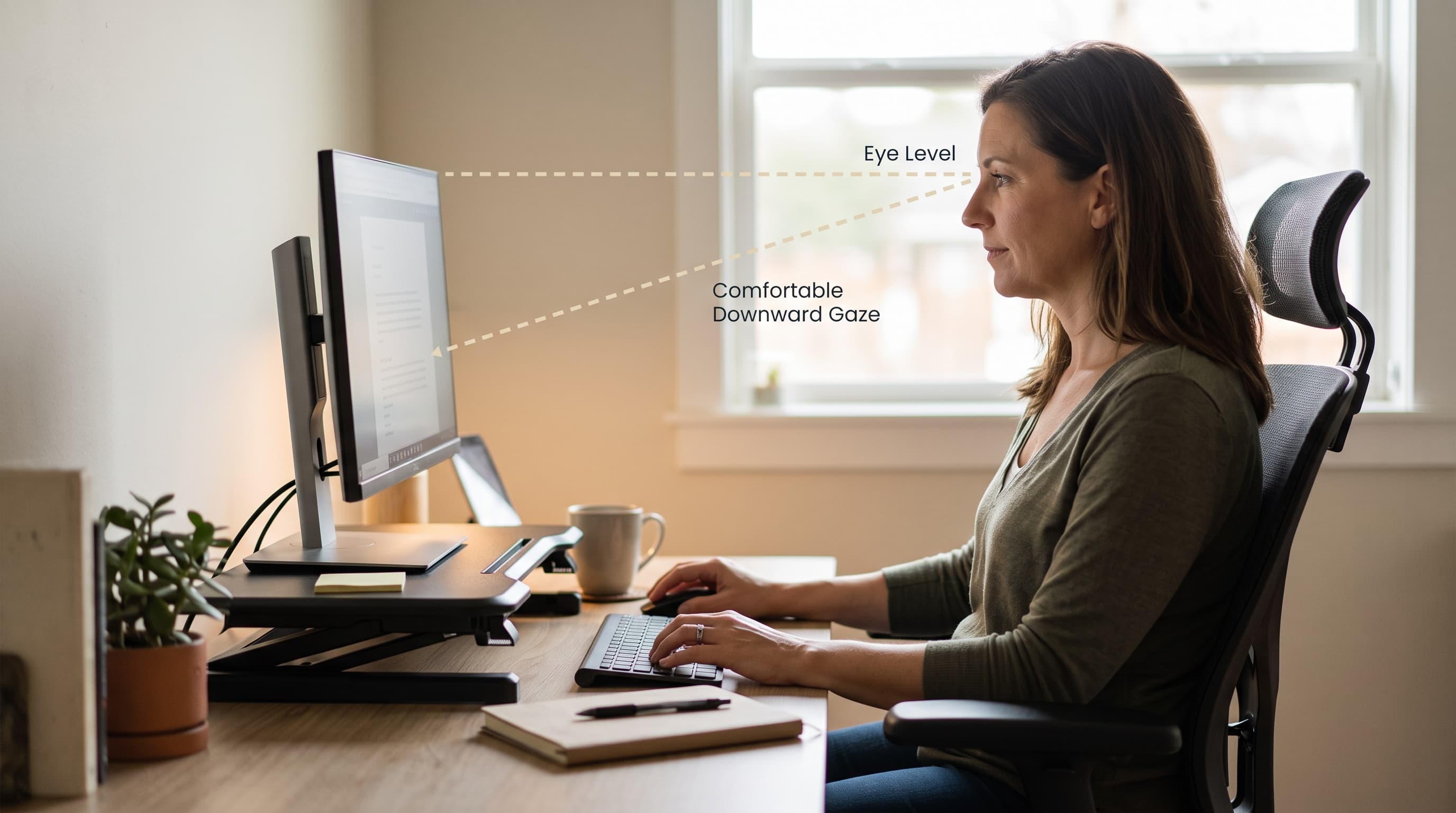
“That’s the idea behind a comfortable downward gaze at your desk as you work.”
Use that demonstration to understand the position, then check your actual workstation.
You should still be able to read comfortably and keep a relaxed posture.
A lower screen position is a practical adjustment, not a diagnosis or a replacement for care.
KEEP THIS – your workday setup check
Keep these three reminders beside your screen and use them as you follow along.
1. Distance breaks. Choose a comfortable point about 20 feet away and look at it for 20 seconds.¹Blink naturally. The PDF also includes the research behind blinking practice.²
2. Screen position. Keep the top of your monitor at or below eye level.⁴Keep your head and neck comfortable as you look slightly downward.
3. Airflow. Check whether a desk fan, ceiling fan, or vent blows toward your face.⁶ Turn off or redirect the airflow while working if it is reaching your eyes.
Small setup changes give you a practical place to start. Notice what helps and what keeps returning.
Before buying another bottle of eye drops
Artificial tears come in different formulations. Some contain lipids—oils that help supplement the oily layer of your tears.⁵
Lipid-containing drops may be useful for some people with evaporative dry eye, but they aren’t automatically the right choice for every screen user.
That’s why the PDF includes a shopping reference rather than a one-size-fits-all recommendation.
You’ll find three preservative-free, lipid-containing options to discuss with your eye-care professional.⁵
Check the exact product name, not just the brand.
Read the label and directions before using a product.
Use the guide to make the conversation easier: what have you tried, what helped, and how long did that help last?
A clearer starting point before your next purchase.
Wear contacts while working?
The updated PDF includes a separate option for contact-lens wearers: OPTASE Intense Dry Eye Drops.
The manufacturer lists this product as preservative-free and contact-lens compatible.⁷ Follow the product instructions and your eye-care professional’s advice.
Contact-lens compatibility is product-specific. Don’t assume every drop from the same brand has the same directions.
The manufacturer describes very little blur on application, rather than a guarantee of no blur.
Keep the exact product name handy when discussing it with your eye-care professional.
If you already use prescription drops, ask how an additional product fits into your existing plan.
Don’t change a prescribed treatment based on this guide alone.
The goal is to help you ask a more useful question before adding another bottle.
What’s inside your free guide
The PDF brings the workday steps, shopping reference, and research together so you don’t have to remember everything from the video.
Use it while you work:
The distance break. A reminder to look away from the screen, choose a point about 20 feet away, and blink naturally for 20 seconds.
The blinking sequence. The close-close-squeeze demonstration, with a reminder to keep it comfortable and stop if it hurts.
The workstation check. A comfortable downward gaze and a check for fans or vents blowing toward your face.
Keep the guide nearby as a reminder of the steps you want to practice.
Use it before your next eye-care conversation:
The shopping reference. Three preservative-free, lipid-containing options, plus a separate contact-lens-compatible option. These are starting points for a discussion, not a recommendation that everyone needs the same drops.
Your workday notes. Record when discomfort begins, what you’ve tried, how long any relief lasts, and what still interrupts your work.
Those details can help you explain the problem more clearly during an appointment.
You don’t have to remember every product name or every difficult afternoon on the spot.
What the research can—and can’t—tell you
The studies behind this guide support specific ideas about screen breaks, blinking, and gaze position. They do not establish that this combined routine will give everyone lasting relief.¹
A blinking-exercise study followed participants for four weeks, rather than testing one brief practice session.²
Treat the guide as a practical starting point.
Here’s how to read the references below.
The monitor-position resource provides ergonomic guidance for a comfortable workstation.⁴
The downward-gaze study measured tear dynamics in healthy volunteers.³ It does not prove that lowering a monitor will eliminate symptoms or reduce your need for drops.
The lipid-drop review discusses formulations for evaporative dry eye.⁵
It does not establish one best product for every person who works on a screen.
The airflow advice and contact-lens product information are additional resources included in the updated PDF.
Keep those different kinds of evidence in mind.
For airflow, the NIH describes the effect of air blowing toward the face.⁶ That supports checking fans and vents as part of your setup.
The references are here so you can see where the guidance comes from.
Your own symptoms and treatment decisions still deserve individual attention.
If relief doesn’t last, what’s next?
If dryness or burning keeps interrupting your work, use the guide’s notes to prepare for an eye-care conversation. It includes a contact-lens product reference as well.⁷
A useful starting point is what happens during a normal workday.
When do your eyes begin bothering you? What have you tried, and how long does it help?
Bring that history with you, especially if you’ve already used prescription drops or had dry-eye treatment.
The question is what deserves a closer look in your own situation.
From general advice to an individual evaluation
This guide gives you practical steps you can use during the workday.
If discomfort keeps returning, a Dry Eye Clarity Evaluation is an opportunity to move beyond general online advice and discuss your own eyes with Dr. Saxena.

That includes explaining what you’ve already tried and what still makes screen work difficult.
As a follow-up to this guide, Dr. Saxena is waiving the standard $125 diagnostic fee.
The waiver applies to the diagnostic fee for the Dry Eye Clarity Evaluation.
It is not a promise that any particular treatment will be recommended or that relief is guaranteed.
You don’t need to figure out the cause on your own before asking for help.
Bring your questions, your workday notes, and the names of any drops or treatments you’ve tried.
Use the calendar below to request your evaluation.
Request your Dry Eye Clarity Evaluation.
203 Narrows Pkwy Ste A, Birmingham, AL 35242Loading calendar...